

 Home
HomeHow to Choose Review Management Tools That Drive Results

 Category:Articles
 June 21, 2026 / AT: 1:38 PM
 2 View
 No Comment
Key Takeaways
Upperly outlines a practical, goal-first framework to help Vancouver marketing teams choose review management tools that deliver measurable results.
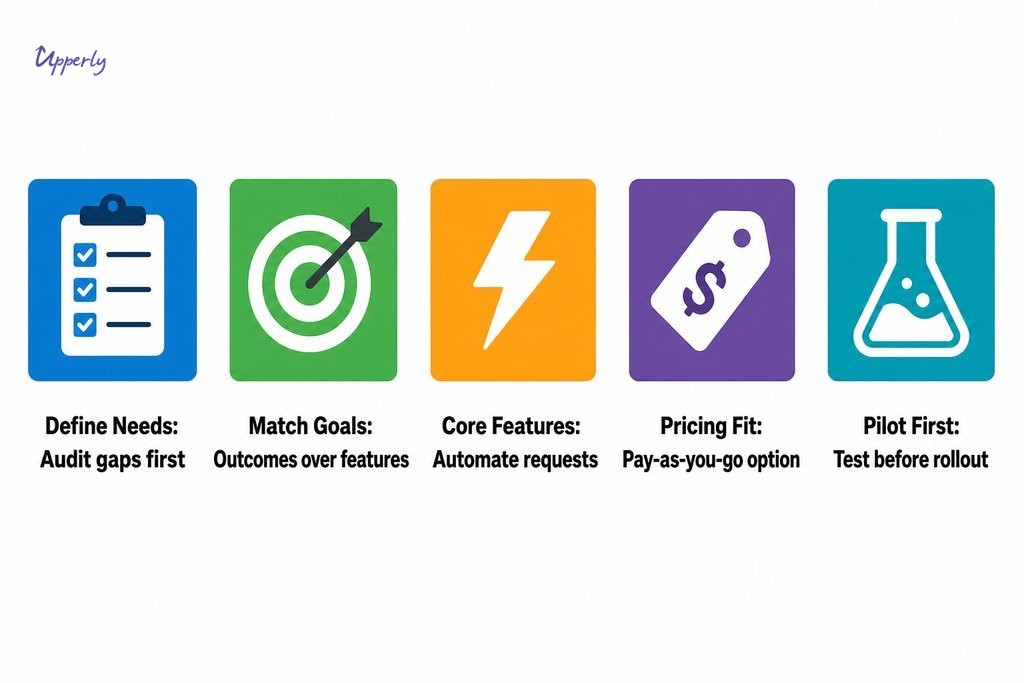
- Start by auditing your current review collection process before evaluating any platform. Knowing your gaps makes every subsequent comparison sharper and prevents overbuying into features you will never use.
- Align tool capabilities directly to your business goals. Whether your focus is conversions, retention, or Google credibility, the right review management features are those that serve your defined outcome, not the longest feature list.
- Pricing models deserve first-order attention. For businesses with seasonal or uneven contact volumes, a pay as you go structure will typically deliver better long term value than a fixed monthly subscription.
- Run a small pilot with a real customer segment before full deployment. This reveals your actual conversion rate, tests platform reporting clarity, and protects your sender reputation before a wide rollout.
- Watch for key red flags during review software evaluation: platforms built for enterprise teams but marketed with small business language, lengthy onboarding requirements, and unclear data ownership policies are all signs of a poor workflow fit.
Choosing the right tools for managing your online reputation looks straightforward until you are actually inside the decision. The market for online review management software is large, fragmented, and growing quickly, which makes it genuinely difficult to separate tools that produce results from those that simply look impressive on a feature page. For marketing and growth teams in Vancouver, the stakes are real. Getting this wrong means wasted budget, stalled review collection, and a credibility gap that competitors are happy to fill.
This guide offers a practical framework for evaluating and choosing review management tools, starting with your business goals and working backwards to the platform that serves them. Whether you are assessing your first tool or reconsidering one that has underperformed, this process will help you make a more confident, results-oriented decision.
Why Most Review Tool Comparisons Miss the Point
Most comparison guides rank platforms by the number of integrations, dashboard views, or automation triggers available, then leave you to figure out which features actually matter for your business. The problem is that a long feature list is not the same as a useful tool.
The goal is not to find the most feature-rich software on the market. The goal is to find the tool that produces measurable outcomes: more reviews collected, higher conversion rates from warm leads, stronger credibility on Google and social platforms, and better customer retention. When you approach tool selection through that lens, the comparison process becomes sharper and far less overwhelming.
Define What You Actually Need Before You Start Comparing
Before you open a single product demo, audit where you currently stand. How are you collecting customer feedback right now? Are you manually following up after purchases, relying on occasional unprompted reviews, or using an automated system? Identifying the gaps in your current process is what makes any subsequent comparison meaningful.
Three questions worth answering before you begin:
- Which review platforms matter most to your customers? For most Vancouver businesses, Google is the priority, but Facebook, Yelp, and the BBB may also carry weight depending on your industry.
- Do you need employee-level feedback to track individual performance?
- How many customers do you contact each month, and does that volume fluctuate seasonally?
Answering these clearly will narrow your options significantly and prevent you from overbuying into features you will never use.
Match Tool Capabilities to Specific Business Goals
Once you understand your gaps, align tool capabilities with the outcomes you actually need:
- Increasing conversions: You need a tool that makes it simple for satisfied customers to leave a public review on the platforms your prospects actually check.
- Improving retention: NPS surveys give you the signal to catch dissatisfied customers before they leave quietly.
- Strengthening Google credibility: Look for reliable automated review requests and clear reporting on how your rating trends over time.
Evaluate platforms based on how directly they serve the outcome you have defined, not on which one has the most polished interface.
| Business Goal | Key Capability Needed | What to Look For |
|---|---|---|
| Increasing conversions | Frictionless public review requests | Simple post-transaction prompts on platforms your prospects check |
| Improving retention | NPS surveys | Sentiment capture before routing customers to a public review |
| Strengthening Google credibility | Automated review requests and trend reporting | Reliable follow-ups and clear rating history dashboards |
Which Features Are Worth Evaluating and Which to Skip
When assessing important features in review management software, separate what directly affects results from what adds administrative weight without adding business value.
Features worth prioritising:
- Automated review requests: If a tool cannot send timely, personalised follow-ups after a transaction, it is not doing the heavy lifting that makes review collection scalable.
- NPS surveys: These help you gauge sentiment before routing customers toward a public review, protecting your rating while maximising positive responses.
- Platform integrations: Only for the platforms you actually use. A tool with fifty integrations is not better than one with five if those five are exactly what your team needs.
- Reporting dashboards: Clear visibility into review volume, average rating, and response rate over time.
Features you can generally skip, unless you specifically need them, include enterprise compliance workflows, multi-location franchise management, and advanced social listening. These add complexity and cost without meaningfully improving results for small to mid-sized teams.
| Feature | Value for Small to Mid-Sized Teams | When to Prioritise |
|---|---|---|
| Automated review requests | High | Always — core to scalable review collection |
| NPS surveys | High | When retention and sentiment tracking matter |
| Platform integrations | Medium | Only for platforms your team already uses |
| Reporting dashboards | High | Always — needed to optimise over time |
| Employee-level feedback | Medium | Service-based businesses tracking staff performance |
| Enterprise compliance workflows | Low | Large organisations with regulatory requirements |
| Multi-location franchise management | Low | Franchise or multi-site operations only |
| Advanced social listening | Low | Larger teams with dedicated social monitoring resources |
The Underused Feature That Gives Service Teams a Real Edge
Employee-specific feedback collection is one of the most underused and genuinely valuable features for service-based businesses. When customers can rate or comment on a particular staff member, you get granular data that helps identify top performers, flag service consistency issues, and improve internal accountability. Customers also tend to give more honest, detailed feedback when responding to a specific interaction rather than a generic prompt, making this kind of insight actionable in a way that aggregate scores rarely are.

How Pricing Models Affect Long-Term Value
Subscription-based pricing dominates the review software market, but it is not the right model for every business. If your customer contact volume is seasonal, as it often is for Vancouver businesses in retail, hospitality, or construction, a fixed monthly fee means paying full price during slow months for a service you are barely using.
Before committing to any platform, calculate your actual monthly email volume across the year and model the cost per review collected under different pricing structures. The math often reveals that a pay-as-you-go model delivers better value for businesses with uneven or moderate contact volumes.
A platform that lets you start at a lower price point with no mandatory subscription gives you room to test, adjust, and scale without locking you into a contract that outlasts your confidence in the tool.

Reputation Tool Comparison: Green Lights and Red Flags
When running a reputation tool comparison, watch for these signals.
Positive signs:
- Clear, honest documentation of what the tool does and does not do
- Straightforward setup that does not require weeks of configuration
- Responsive customer support that answers questions before you have signed up
- Explicit data ownership policies so you can export your review history if you switch platforms
Red flags to watch for:
- Enterprise-grade platforms marketed with small business language
- Tools that require a dedicated administrator or a lengthy onboarding call just to get started
- Custom pricing conversations before you can even trial the product
Tool selection should be driven by workflow fit, not marketing positioning. If the operational pace required to use a tool does not match your team size, it will underperform regardless of its feature set.
When a Done-for-You Setup Makes More Sense
For marketing teams that are already stretched thin, configuring a new platform properly, including campaign logic, email templates, integrations, and testing, is not a small time investment. If your team does not have that bandwidth, a done-for-you setup option can reduce the time to first results and lower the risk of launching a campaign that underperforms due to a configuration mistake. Full-service onboarding means the tool is working correctly from day one, which matters more than most teams realise until they have experienced the alternative.
What Vancouver Businesses Should Verify Before Committing to a Review Platform
A practical review management software comparison checklist should cover several areas that are easy to overlook after a good demo. These are the questions to ask before buying review software that most vendors will not raise on their own:
- Is there a free trial or low-commitment entry point that lets you test with a real customer segment before full deployment?
- Can you export your review data and contact history if you decide to switch platforms later?
- Does the platform comply with Canadian privacy requirements, including CASL obligations and how customer email data is stored and used?
- Does it integrate cleanly with the CRM, email platform, or point-of-sale system your team already uses?
Why a Pilot Run Before Full Rollout Is Worth It
Testing with a real customer segment before a full rollout is one of the most consistently undervalued steps in this process. A small pilot reveals how customers actually respond to your review request emails, what your real conversion rate looks like, and whether the platform’s reporting gives you the clarity you need to optimise. It also protects your sender reputation and your customer relationships if something in the setup needs adjustment.
For review management tools for ecommerce businesses and service-based teams alike, a pilot approach before full commitment tends to produce better long-term results and fewer surprises.
If you are ready to find a tool built around simplicity, results, and flexible pricing, Upperly is worth a closer look. Reach out to learn how our platform helps Vancouver businesses collect honest reviews, improve their rankings, and build the kind of credibility that converts.
Frequently Asked Questions About Review Management Tools
What is the most important feature to look for in review management tools?
Automated review requests tend to have the most impact. A tool that sends timely, personalised follow-ups after each transaction removes the manual effort that most businesses struggle to sustain consistently. Without reliable automation, review collection becomes irregular regardless of how capable the rest of the platform is.
How do I know if a review management tool is right for my business size?
The clearest signal is whether the tool matches your team’s operational capacity. If setup requires a dedicated administrator or a lengthy onboarding process, it is likely built for a larger organisation. Small to mid-sized businesses should look for straightforward configuration, clear documentation, and support available before you commit.
Do review management tools need to comply with Canadian privacy laws?
Yes. Any tool used to contact customers by email must align with CASL, Canada’s Anti-Spam Legislation. Before purchasing, confirm how the platform handles consent, email opt-outs, and where customer data is stored. Reputable vendors will document this clearly rather than leaving you to ask.
Is a subscription pricing model always the best option?
Not for every business. If your customer contact volume fluctuates seasonally, as is common in retail, construction, or hospitality, a fixed monthly subscription means paying full price during slow periods. A pay-as-you-go or usage-based model can offer better value when volume is uneven throughout the year.
How should I test a review management tool before committing to it?
Run a small pilot with a real customer segment rather than relying solely on a demo. This reveals your actual review conversion rate, how customers respond to request emails, and whether the reporting is clear enough to act on. A pilot also protects your sender reputation if configuration adjustments are needed before a full launch.
What review platforms should Vancouver businesses prioritise?
Google is the highest priority for most Vancouver businesses because it directly influences local search rankings and consumer trust. Depending on your industry, Facebook, Yelp, and the Better Business Bureau may also carry meaningful weight. Choose a tool that supports the platforms your customers actually consult, not every platform available.
Social Share


Online review management
One of the best services provided by Google is Google review. This service will enable people to express their opinions on almost anything. If you…


Create a reputation strategy
Create a reputation strategy is very important for all businesses. Creating an online reputation strategy is dependent on the requirements of the organization and business.…

How to Turn Customer Feedback into Better Reviews
Key Takeaways Turning customer feedback into better reviews requires a connected system that segments sentiment, times requests strategically, and closes the loop between private…

How to Choose Review Management Tools That Drive Results
Key Takeaways Upperly outlines a practical, goal-first framework to help Vancouver marketing teams choose review management tools that deliver measurable results. Start by auditing your…