

 Home
HomeHow NPS Fits Into Your Customer Workflows

 Category:Articles
 July 13, 2026 / AT: 11:39 AM
 211 View
 No Comment
Key Takeaways
NPS data delivers real business value only when it flows automatically into your CRM, helpdesk, and customer workflows so your team can act on feedback fast.
- NPS scores collected in isolation rarely drive action; connecting survey responses to your CRM and helpdesk through feedback workflow integration ensures the right people receive the right data at the right moment.
- A CRM survey connection enriches contact records with real time sentiment, allowing sales and success teams to flag promoters for upsell conversations and route detractors into retention workflows before renewal discussions go wrong.
- Helpdesk feedback workflow integration converts low scores into support tickets automatically, giving agents full context including the customer score, verbatim comment, and account history so they can respond with empathy rather than a generic script.
- Before committing to any NPS platform, evaluate integration depth on three points: how accurately it maps fields to your CRM data structure, how granular the trigger logic is, and whether syncing happens in real time or in batches that delay your detractor response.
- Involve IT, RevOps, or a CRM specialist early when your setup requires custom API connections, complex trigger logic, or integrations that touch compliance sensitive records, as catching misalignment before launch is far easier than correcting it after your first campaign runs.
Collecting an NPS score is the easy part. The harder question is what happens to that score once it arrives. For customer experience managers, the real value of NPS comes from making that data travel through your tools, reach the right people, and trigger a meaningful response before a frustrated customer quietly moves on. Without deliberate integration, survey results accumulate in a dashboard while the rest of your operations run on guesswork. This challenge is felt across Vancouver and throughout British Columbia, where competitive markets in SaaS, professional services, and retail make every piece of customer feedback worth acting on.
This article covers the key points where NPS data connects to your existing systems, what strong integration looks like in practice, and how to tell whether your current setup is genuinely closing the feedback loop or simply generating reports.
Why NPS Scores Lose Value Without Workflow Integration
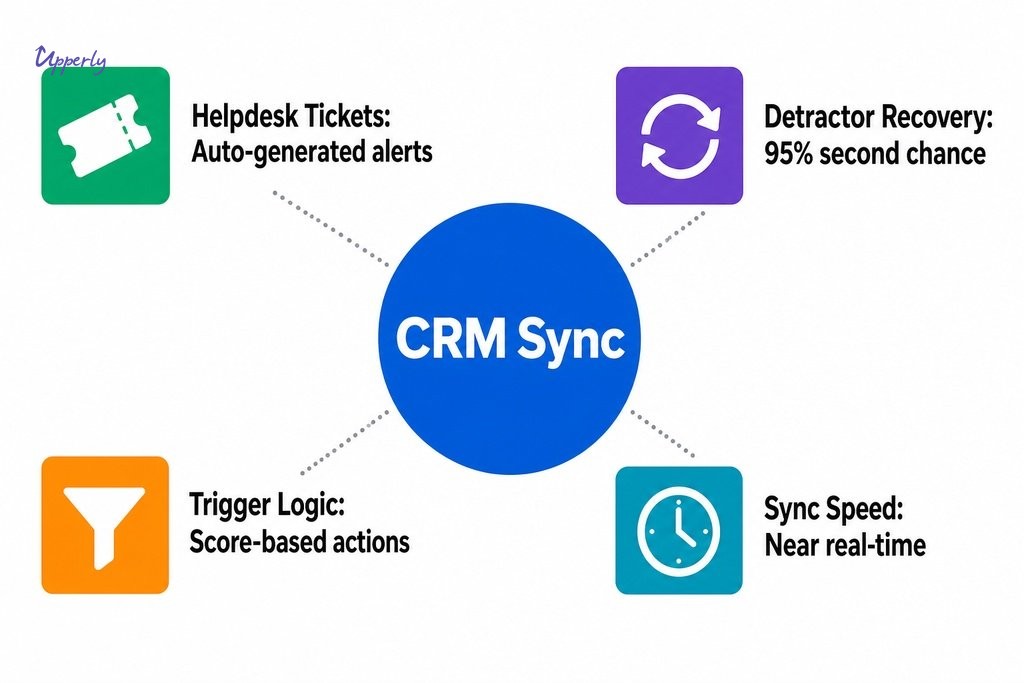
NPS data collected in isolation rarely drives action. When survey results sit disconnected from your CRM, helpdesk, or customer success tools, the gap between a customer expressing dissatisfaction and a team member responding can stretch from hours into days. Research cited by LiveChat found that 95% of NPS detractors are willing to give a business a second chance when their complaints are addressed promptly, meaning the speed of your internal response matters nearly as much as the quality of it.
Disconnected feedback also makes meaningful segmentation close to impossible. Without a link between survey responses and customer records, your team cannot quickly identify which detractors represent high-value accounts, which promoters are ready for a referral ask, or which passives are drifting toward churn. As Qualtrics notes, layering churn data on top of NPS helps predict when a customer is likely to leave, but that linkage only becomes possible through deliberate feedback workflow integration.
How NPS Integrates with Customer Workflows Across Your Tech Stack
NPS becomes genuinely useful the moment it stops being a standalone report and starts flowing through the tools your team already relies on. A survey response comes in, and your CRM, helpdesk, or communication platform responds automatically. The core integration points below are where that flow either works reliably or breaks down. For Vancouver-based teams managing distributed customers across time zones, getting those integrations right matters all the more.
Connecting NPS to Your CRM for a Complete Customer View
A CRM survey connection enriches each contact record with sentiment data at the moment it is captured. When a customer submits an NPS response, that score and any accompanying comment can be written directly into their profile, attached to their account history, and used to update segmentation tags or deal stages automatically. Sales and success teams get a real-time view of how each customer feels, not just how they last behaved. A promoter can be flagged for a referral or upsell conversation; a detractor can be routed to a retention workflow before a renewal conversation goes sideways.
The crm integration for nps feedback is especially valuable when NPS scores are tied to lifecycle stages. A customer who scores a nine after their third purchase signals something very different from one who scores a four after their first support interaction. With proper field mapping in your CRM, those distinctions become filters you can act on rather than footnotes buried in a monthly report. CX managers can build views, automated sequences, and reports that reflect the actual sentiment of their customer base rather than relying on lagging indicators.
Feeding NPS Responses into Your Helpdesk Feedback Workflow
Low NPS scores are a service risk, and the most effective teams treat them as support events. When a detractor response automatically generates a ticket or escalation flag inside your helpdesk, your team can respond within hours rather than days. The helpdesk integration for nps follow up removes the manual step of reviewing survey exports, identifying at-risk accounts, and forwarding that information to the right agent, which is precisely where delays happen and where detractors fall through the cracks.
Effective helpdesk integration also preserves context. When a ticket is created from an NPS response, the agent who picks it up should already see the customer’s score, their verbatim comment, and relevant account details pulled through from your CRM. That context lets the agent respond with empathy and specificity rather than a generic follow-up script. Leading NPS platforms support native integrations with tools like Salesforce, HubSpot, Zendesk, and Intercom to make this kind of seamless customer data integration and workflow automation possible.
| Integration Type | Primary Benefit | Who Acts on It | Typical Trigger | Risk if Missing |
|---|---|---|---|---|
| CRM Integration | Enriches contact records with real-time sentiment data | Sales and customer success teams | Any NPS response (promoter, passive, or detractor) | Missed upsell and referral opportunities; lagging segmentation |
| Helpdesk Integration | Converts low scores into actionable support tickets automatically | Support agents and escalation teams | Detractor score below defined threshold | Delayed recovery; detractors falling through the cracks |
What Strong Customer Data Integration Actually Looks Like
Strong integration does not mean connecting every tool to every other tool. It means NPS responses land in the right places, with the right data attached, at the right moment. In practice for Vancouver-based teams, that looks like:
- An NPS score appearing in a contact’s activity timeline the moment a survey is submitted
- A deal stage updating when a high-value customer moves from passive to detractor
- A support queue receiving a pre-populated ticket within minutes of a low score arriving
The data moves without human intervention, and the people who need it receive it in the context where they already work.
Before assuming your tools communicate reliably, it is worth verifying a few things. Confirm that your survey platform maps responses to the correct contact fields in your CRM rather than creating duplicate records. Confirm that trigger logic fires based on score thresholds you define, not just on survey completion. And confirm that syncing happens in near real-time rather than in batches that could delay a detractor response by several hours. These are common failure points in feedback workflow setups that look clean on paper but underperform in practice.

Key Questions to Ask When Evaluating a Feedback Workflow Integration
When teams explore how to choose nps software that connects reliably with their existing stack, the conversation often starts with integration breadth and ends there. That is a mistake. The more important questions involve integration depth.
How accurately does the platform map NPS response fields to your CRM’s data structure? A native CRM survey connection with Salesforce is only as useful as the field mapping behind it. How granular is the trigger logic? Can you fire different actions for a score of three versus a score of six? How frequently does the sync run? Data latency is a genuine issue on some platforms, where responses collected in the evening may not reach your CRM until the following morning.
Realistic limitations deserve honest consideration before you commit to a configuration. Field compatibility problems arise when your CRM’s contact schema does not have a natural home for NPS data, forcing workarounds that create fragility over time. Integrations that work well at launch can also break when either platform releases an update. These practical details are what separate a feedback workflow integration that serves your team reliably from one that requires constant attention.
| Evaluation Area | Question to Ask | Why It Matters |
|---|---|---|
| Field Mapping | How accurately does the platform map NPS fields to your CRM’s data structure? | Poor mapping creates duplicate records and unreliable segmentation |
| Trigger Granularity | Can you fire different actions for a score of three versus a score of six? | Coarse triggers miss nuance and route responses to the wrong workflow |
| Sync Frequency | How frequently does the sync run — real-time or batched? | Batched syncs can delay detractor responses by hours, reducing recovery chances |
| Long-term Stability | Does the integration hold up after platform updates? | Integrations that break silently require consistent monitoring to catch failures |

Where Upperly Fits Into a CX Team’s Feedback Stack
Upperly is built for CX managers who want consistent, organic feedback without the complexity of a heavy enterprise setup. The platform’s NPS survey tools are designed to deliver reliable data output from the start, and the automated feedback collection process is straightforward enough that teams can begin gathering responses without a lengthy implementation project. For growing companies across Metro Vancouver that need results quickly and do not have a dedicated technical team to manage configuration, Upperly’s done-for-you setup option handles the initial build so your focus stays on insights rather than infrastructure.
Upperly’s pay-as-you-go model removes one of the more common friction points in adopting new feedback tools: the pressure of volume commitments. Rather than locking into a monthly subscription before you know what response volume your campaigns will generate, you pay for the email volume you actually use, with packages starting as low as $20 CAD. That flexibility makes it easier to run a focused NPS programme across specific customer segments, assess the results, and scale up deliberately. For CX teams who want their feedback programme to integrate cleanly with their existing CRM and helpdesk tools, Upperly provides the consistent, well-structured customer data integration that makes those connections reliable.
When to Bring In IT, RevOps, or a CRM Specialist
Most CX managers can configure a basic NPS integration themselves when the platforms involved offer native connectors and clear documentation. The moment complexity increases beyond that baseline, the conversation should include IT, RevOps, or a CRM specialist. Custom API connections, multi-object data mapping, complex trigger logic spanning multiple systems, or integrations that touch compliance-sensitive records are all scenarios where involving technical support early prevents costly rework later.
Before launching an integrated NPS programme, a few conversations are worth having upfront:
- With your CRM administrator: Confirm which fields the NPS data will populate and that they are mapped correctly.
- With your helpdesk team: Confirm that tickets generated from survey triggers will be routed to the right queue.
- With RevOps: Align on how NPS scores will interact with deal stages or renewal workflows, especially if those stages feed into revenue forecasts.
These conversations are brief when the integration is simple and essential when it is not. Getting them out of the way before launch is far easier than untangling misaligned data after your first campaign has run.
If you are ready to build a feedback programme that actually connects to how your team works, Upperly is a practical starting point. Reach out to explore how the platform’s NPS tools, automated collection, and flexible setup options can support the workflow integration your CX team needs.
Frequently Asked Questions
What does it mean to integrate NPS with customer workflows?
NPS integration means survey responses automatically flow into the tools your team already uses, such as your CRM, helpdesk, or communication platform, without manual data transfer. A low score can trigger a support ticket in Zendesk or update a contact record in HubSpot the moment a response is submitted.
Which tools does NPS typically integrate with?
NPS platforms commonly integrate with CRMs like Salesforce and HubSpot, helpdesks like Zendesk and Intercom, and automation tools. The specific connectors available depend on your survey platform, so confirming native integration support before committing to a tool is worthwhile.
How quickly should a team respond to a detractor NPS score?
Responding within a few hours of receiving a detractor score can improve the chance of recovery. Research cited by LiveChat suggests that the majority of detractors are willing to give a business a second chance when their concern is addressed promptly.
Can NPS data create duplicate records in a CRM?
Yes, this is a common issue when field mapping is not configured carefully. If the survey platform cannot match a respondent to an existing contact record, it may create a new one. Verifying your mapping logic before going live helps prevent this problem.
When should a CX manager involve IT or RevOps in an NPS integration?
Involve IT or RevOps when the setup goes beyond native connectors, for example when you need custom API connections, complex trigger logic across multiple systems, or integrations that touch compliance-sensitive data. Getting them involved early prevents costly rework after launch.
What is a pay-as-you-go NPS platform and is it suitable for smaller teams?
A pay-as-you-go model means you pay for the email volume you actually send rather than committing to a fixed monthly subscription. This suits smaller or growing teams who want to run focused NPS campaigns, assess results, and scale up gradually without upfront volume commitments.
Social Share


Email Templates for Asking Online Reviews
Email is one way of communication that many people around the world use. Companies and organizations can use email to ask their customers to provide…


How to grow positive google review?
It's important for all businesses to get positive google review through customers. Getting positive google review brings a lot of business benefits, which is most…

Smart Questions to Ask Before Buying Review Software
Key Takeaways Ask the right questions about data ownership, pricing, automation, and integrations before committing to any review software platform. Every question you bring into…

SEO can improve your online reputation management
Online reputation management is an essential phrase in Internet marketing and searches engine optimization at the moment, and of course, no business tends to give…