

 Home
HomeReview Request Automation Features That Drive Real Growth
 Category:Articles
 July 4, 2026 / AT: 1:01 PM
 342 View
 No Comment
Key Takeaways
The review request automation features a platform offers determine whether a campaign builds sustainable review volume or fades after the first send.
- Event based trigger logic that sends requests immediately after a completed experience consistently outperforms scheduled batch sends because it reaches customers when recall and willingness to engage are highest.
- Employee level personalization connects each request to the customer’s actual interaction, improving relevance and response rates compared to generic outreach addressed to a broad contact list.
- Reminder sequences should include only one follow up sent three to five days after the initial request; additional messages risk damaging sender reputation and creating a poor customer experience.
- Canadian businesses using SMS for review campaigns must comply with CASL consent requirements; SMS works best as a secondary channel that adds incremental lift once a solid email sequence is already in place.
- Tracking open rate, conversion rate, review velocity, and platform distribution gives teams the data needed to refine trigger logic, adjust timing, and direct effort toward the channels producing the strongest results.
When marketing and growth teams evaluate tools for collecting customer reviews, the conversation often centres on whether a platform sends requests automatically. That framing misses the point. The specific review request automation features a platform offers determine whether a campaign builds sustainable review volume or fades out after the first batch of emails lands. For teams in Vancouver managing competitive local markets, whether in neighbourhoods like Kitsilano, Mount Pleasant, or the North Shore, the difference between a well-configured automation system and a generic one shows up directly in search visibility, trust signals, and conversion rates.
According to BrightLocal’s 2026 Local Consumer Review Survey, 95% of consumers read online reviews before making a purchase decision. That figure reframes review collection as a revenue function, not a marketing nice-to-have. The automation capabilities a platform provides directly shape how consistently that function performs, which is why feature evaluation needs to be grounded in measurable outcomes rather than surface-level comparisons.
Why Automation Features Determine Review Campaign Performance
A platform that simply fires off review requests on a schedule will generate some responses, but it will not sustain the kind of review velocity that compounds over time. What separates high-performing campaigns from low-performing ones is the logic underneath them: when requests go out, to whom, through which channel, and what happens when someone does not respond.
Growth teams evaluating tools for the first time often focus on the feature list rather than on how features connect to outcomes. A better frame is to ask which capabilities directly influence open rates, response rates, and platform distribution. Understanding important features in review management software means looking at the full automation loop, from trigger logic and personalization to follow-up sequencing and reporting, rather than treating any single capability as sufficient on its own.
The Four Core Areas That Shape Campaign Results
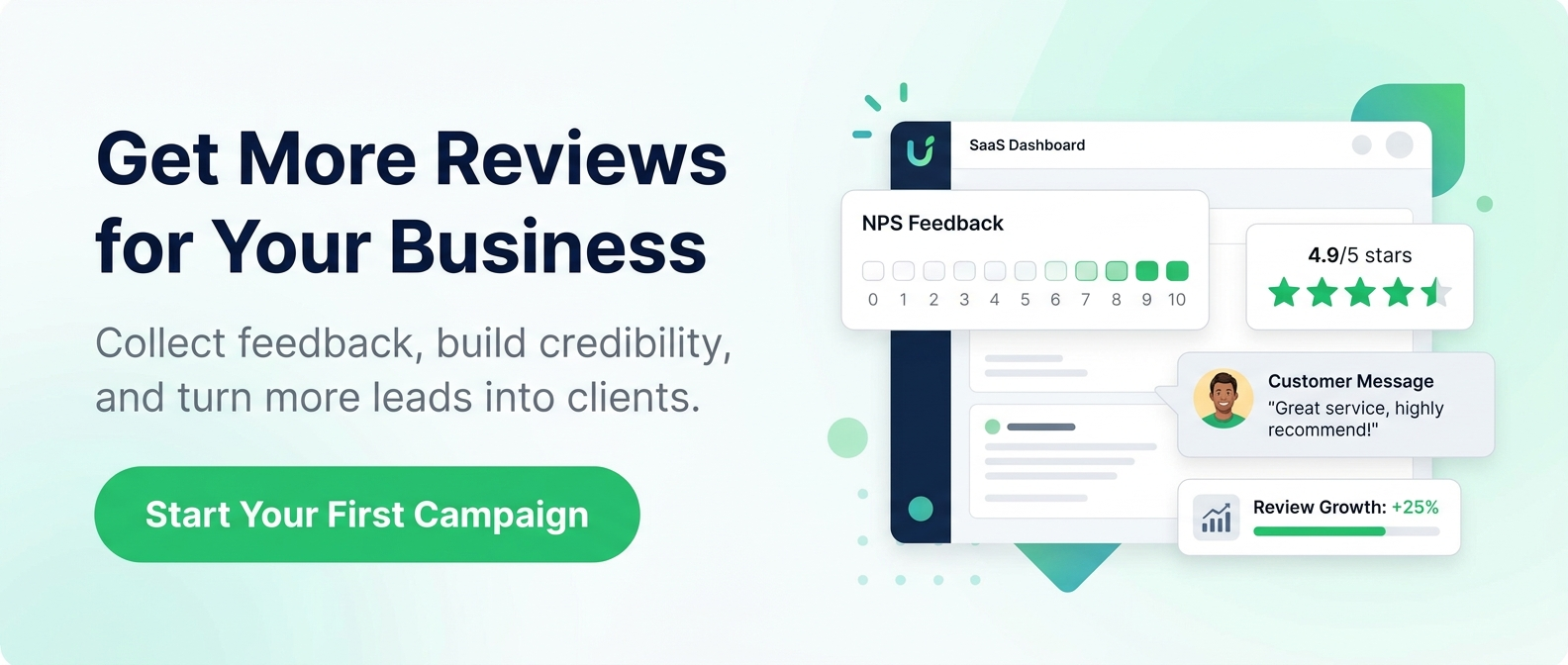
The features that matter most fall into four core areas: trigger logic, personalization, follow-up sequencing, and reporting. Together, these determine whether a campaign reaches the right customer at the right moment, through the right channel, with a message that feels relevant enough to act on. The sections below cover each area and explain why it affects outcomes.
Email Review Request Automation Features Worth Evaluating
Email remains the backbone of most review collection campaigns, and the quality of email automation varies significantly between platforms. The foundational capabilities that drive performance include send timing, personalization fields, trigger logic, and deliverability controls. A platform that handles all four consistently will outperform one that offers only basic scheduling, because each element affects whether the request reaches the inbox, gets opened, and prompts action.
Timing and Trigger Logic
Timing is one of the most consequential variables in any review request campaign. Research from the Northwestern University Spiegel Research Center suggests that requesting a review immediately after a positive customer experience tends to produce the highest response rates. For service businesses across Metro Vancouver, that moment might be job completion. For product businesses, it might be confirmed delivery.
Platforms that allow teams to configure event-based triggers, rather than relying on scheduled batch sends, give campaigns a structural advantage from the outset. The request lands when the customer’s experience is fresh and their willingness to engage is highest.
Personalization at the Employee Level
Generic review requests addressed to “valued customer” from “our team” tend to underperform because they feel disconnected from the actual experience. Platforms that support employee-level personalization allow teams to route requests based on which team member handled the interaction. This creates a natural link between the request and the customer’s memory of the service, which improves both relevance and response rates.
Upperly’s employee-specific feedback capability takes this further by allowing businesses to collect performance data tied to individual staff members, giving both the customer and the business a more meaningful feedback loop.

How Review Reminder Features Affect Completion Rates
A single request rarely converts the majority of recipients. Most customers who intended to leave a review simply forgot, and a well-timed follow-up can recover a meaningful share of those non-responders.
Reminder features need to be designed carefully, because the difference between a helpful nudge and an unwelcome sequence is often just one extra message. Best practice, supported consistently across credibility research, is to limit the total sequence to two messages: the initial request and one follow-up sent three to five days later.
Beyond timing, reminder logic should respond to customer behaviour rather than running on a fixed schedule regardless of what has already happened. If a customer has already left a review, a follow-up reminder creates a poor experience and signals that the platform lacks basic intelligence. Frequency caps and opt-out handling are equally important for protecting sender reputation. Platforms that skip these guardrails put long-term email performance at risk in exchange for short-term send volume.
SMS Review Request Automation for Canadian Businesses
SMS offers a channel advantage that email cannot match in terms of open rates. Text messages are typically read within minutes of delivery, which creates an immediacy that email sequences cannot replicate. For growth teams that have already optimised their email campaigns and are looking for incremental lift, SMS can meaningfully increase overall review volume when used as a secondary channel.
Canadian businesses using SMS for review campaigns must operate within the requirements of Canada’s Anti-Spam Legislation (CASL), which governs commercial electronic messages including texts. Consent requirements under CASL are specific, and teams should verify that any platform they use supports compliant opt-in handling before activating SMS outreach. This applies equally to businesses operating across Greater Vancouver and throughout British Columbia.
For many teams managing campaigns across multiple locations or service types, a common situation for Vancouver businesses serving clients from Burnaby to the Tri-Cities, starting with a well-configured email sequence and expanding to SMS once the foundation is solid is the more manageable approach.
| Factor | SMS | |
|---|---|---|
| Typical read speed | Varies; often hours after delivery | Typically within minutes of delivery |
| Personalization depth | High — supports employee-level routing and custom fields | Limited — short message format constrains content |
| Compliance requirement (Canada) | CASL consent required | CASL consent required; opt-in handling critical |
| Best use case | Primary review request channel; full sequences | Secondary channel for incremental lift after email |
| Implementation complexity | Lower — widely supported by platforms | Higher — requires compliant opt-in infrastructure |
How Segmentation Improves Automated Review Invitations
Not every customer is the same, and not every review campaign should treat them as if they were. Automated review invitation features that support segmentation allow teams to target requests by product line, service type, location, or individual employee. This specificity improves the relevance of each request and increases the likelihood that the resulting review reflects the customer’s actual experience.
Segmentation becomes especially powerful when combined with NPS survey data. Platforms that integrate Net Promoter Score surveys into the review collection workflow allow teams to identify satisfied customers before routing them toward public review platforms. Customers who score the business highly are more likely to leave a positive review, and directing them to Google, Facebook, Yelp, or the BBB at the right moment in the sequence tends to produce better outcomes than sending undifferentiated requests to an entire contact list.
The BrightLocal survey also found that businesses appearing in the top three local search positions average 47 reviews, connecting consistent, segmented review collection directly to improved local search visibility in competitive markets like Vancouver, where service businesses routinely compete across multiple neighbourhoods and service areas.

Which Review Campaign Metrics Teams Should Track
Setting up automation is only the beginning. Teams that see sustained growth from review campaigns treat metrics as an ongoing feedback loop rather than a post-launch report. The review analytics features that matter most include request open rate, request-to-review conversion rate, review velocity over time, and platform distribution.
Open rate reveals whether the timing, subject line, and sender name are working. Conversion rate shows whether the message content and ease of leaving a review are strong enough to drive action after the open. Review velocity tracks whether the campaign is generating consistent volume or experiencing drop-off, which often signals a deliverability or sequence issue. Platform distribution matters because Statista data shows that 81% of online users in the United States use Google to evaluate local businesses, a pattern closely mirrored in Canadian markets including Vancouver, making Google the priority destination for most review campaigns.
Teams that monitor these metrics regularly can refine trigger logic, adjust reminder timing, and reallocate effort to the channels generating the strongest return.
| Metric | What It Measures | What Underperformance Signals |
|---|---|---|
| Open rate | Whether timing, subject line, and sender name are effective | Deliverability issues or weak subject line |
| Request-to-review conversion rate | Whether message content and review ease drive action after open | Friction in the review process or irrelevant messaging |
| Review velocity | Consistency of review volume over time | Sequence drop-off, deliverability, or trigger logic issues |
| Platform distribution | Where reviews are landing (e.g., Google, Facebook, Yelp, BBB) | Imbalance; over-reliance on lower-priority platforms |
Choosing the Right Platform for Your Team’s Capacity and Goals
Not every marketing team has the bandwidth to configure a complex automation system from the ground up. The best platform for a given team is not always the one with the most features. It is the one that matches the team’s actual capacity and growth objectives. A platform that requires weeks of implementation work before generating a single review is not practical for a growth team managing multiple priorities in parallel.
Flexible models that offer pay-as-you-go pricing and done-for-you setup options address this reality directly. Upperly’s approach allows businesses to start with a specific email volume rather than committing to a subscription, with packages beginning at $20. For teams that need results without a long implementation runway, whether you’re running a single-location business in East Vancouver or managing several service areas across the Lower Mainland, a full-service setup option removes the configuration burden entirely while still producing a campaign built around the business’s specific triggers, segments, and goals.
Before committing to any platform, teams should verify contract terms, volume scalability as the business grows, and the level of support available when campaigns need adjustment. ReviewTrackers research suggests that businesses responding to reviews earn more revenue on average than those that do not, which means the support structures around a review platform carry real commercial weight. A setup that runs reliably and gets managed consistently will generally outperform a more sophisticated system that sits partially configured.
If your team is ready to move from manual review collection to a system that generates consistent results, Upperly is built to make that transition straightforward. Reach out to learn how the platform can be configured around your business’s specific workflow, whether you want to manage it yourself or hand it off entirely.
Frequently Asked Questions About Review Request Automation Features
What are the most important review request automation features to look for?
The most important features are event-based trigger logic, employee-level personalization, follow-up reminder sequencing, and campaign analytics. Together these determine whether requests reach customers at the right moment, feel relevant, recover non-responders, and produce data to guide ongoing improvement.
How soon after a purchase or service interaction should a review request be sent?
Send the request as soon as the experience is complete while it is still fresh, typically within 24 hours of job completion or confirmed delivery. Research from the Northwestern University Spiegel Research Center supports immediate post-experience outreach as the approach most likely to yield strong response rates.
How many follow-up reminders should a review request sequence include?
Best practice is one follow-up reminder, sent three to five days after the initial request. Additional follow-ups risk damaging sender reputation and creating a poor customer experience, particularly if the customer has already left a review and the platform has not suppressed the reminder.
Is SMS a viable channel for review request automation in Canada?
Yes, SMS can meaningfully increase review volume as a secondary channel alongside email. Canadian businesses must comply with CASL consent requirements before texting customers, so verify that your chosen platform supports compliant opt-in handling before activating any SMS outreach.
How does customer segmentation improve review campaign results?
Segmentation ensures each request is relevant to the customer’s actual experience. Routing NPS promoters toward public review platforms, rather than sending the same message to every contact, increases the likelihood of positive reviews and reduces the risk of directing dissatisfied customers to public channels.
Which metrics should teams monitor to evaluate review campaign performance?
Track open rate, request-to-review conversion rate, review velocity, and platform distribution. Monitoring these together helps identify whether underperformance stems from deliverability problems, weak message content, poor timing, or an imbalance in where reviews are landing.
Social Share


What is Customer Retention? Definition, Importance, Examples
Customer retention helps you create beautiful relationships with your customers. You do not just have a website or store; they trust you with your money…


How to Choose Review Management Tools That Drive Results
Key Takeaways Upperly outlines a practical, goal-first framework to help Vancouver marketing teams choose review management tools that deliver measurable results. Start by auditing your…

How NPS Fits Into Your Customer Workflows
Key Takeaways NPS data delivers real business value only when it flows automatically into your CRM, helpdesk, and customer workflows so your team can act…

Why Fresh Reviews Shape Customer Trust and Sales
Key Takeaways Review recency directly shapes buyer trust and conversions, with 97% of consumers considering freshness at least somewhat important when making a purchase decision.…